
How to Convert Raster Images to Vector Graphics

Short answer: you convert a raster image (JPG, PNG, GIF, TIFF) to vector either by auto-tracing it (Illustrator Image Trace, CorelDRAW PowerTRACE, Inkscape Trace Bitmap) or by redrawing it with the Pen tool on a locked layer. Auto-trace is fast and works on clean, high-contrast art. Logos with small text, blurry sources and anything you will print large, cut or embroider usually need a hand redraw. Save the result as AI, EPS, SVG or PDF.
On this page
Raster to vector methods compared
| Method | Tool | Speed | Quality on logos | Cost |
|---|---|---|---|---|
| Auto-trace | Illustrator Image Trace | Seconds | Good on clean art; rough on blurry or small text | Subscription |
| Auto-trace | CorelDRAW PowerTRACE | Seconds | Good on clean art | Paid |
| Auto-trace | Inkscape Trace Bitmap | Seconds | Good on simple shapes | Free |
| Auto-trace | Online tracers (Vector Magic, Vectorizer.AI) | Seconds | Varies; check edges and text | Paid plans |
| Manual redraw | Pen tool in Illustrator, Inkscape or CorelDRAW | Minutes to hours | Smooth curves, editable text, exact colors | Your time, or a service |
Designers convert raster images to vector graphics to get distortion-free images. Since raster images are not all device-friendly, vector graphics are needed. Printers, sign makers and engravers ask for vector files for logos, text and line art, because vector images can be enlarged without limit. From a tiny icon to a bigger size billboard all you can create in vector formats. The colors and edges of vector images are tremendously flawless and sharp. On the other hand, raster graphics get pixilated during enlarging for use on billboards.
What are the popular formats of raster images and vector graphics?
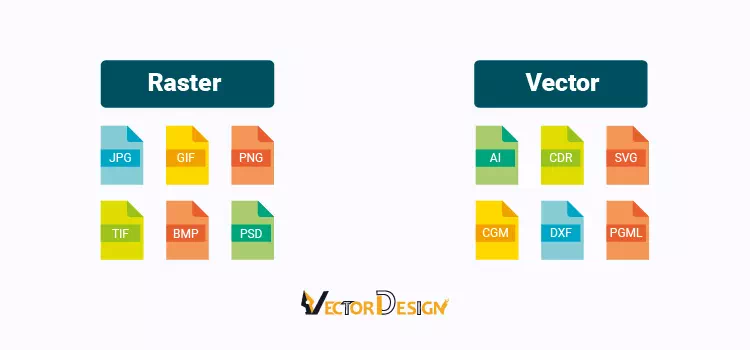
The most popular raster image formats contain extensions like JPG, GIF, PNG, TIF, BMP, and PSD. On the other hand, the vector extensions are AI, CDR, and SVG. The common format for both the raster and vector images is EPS and PDF. So, if you want to convert raster images into vectors, that means, you have to convert raster images’ format to vector image format.
Convert Raster Images
If you need vector images, you can turn a raster image to a vector file by using both Photoshop and Illustrator. Here we are going to show you step by step raster to the vector conversion process.
Vector conversion in Photoshop
If you are a Photoshop user, you can do vector conversion in Photoshop. Follow the steps-
- Open the raster image in Photoshop. Make it duplicate and keep hide one so that you do not lose the original image. Ok, zoom the image and you will see the edge of the image is blur and pixilated.
- Take any selection tool like Pen tool, Lasso tool, Magic Wand Tool, Color Range, or any other tool. Based on the image type and complexity, you have to take the selection tool. The professionals always recommend creating a path with Pen Tool.
- Select the stroke color and create a Path around the image edge.
- When the path creation is done, you can fill the image with solid color from the Adjustment color or keep it as a line drawing or line art. Here if you zoom the image, you will get the lossless image.
- Finally, export the path: File > Export > Paths to Illustrator, or save a PDF/EPS that keeps shape layers as vectors. Photoshop is mainly a pixel editor, so for real vector work Illustrator or Inkscape is the better tool.
Vector conversion in Illustrator
If you are an Adobe Illustrator user, you can create a vector image easily since the vector is the native format of this tool. Let’s have a look at the tutorial about how to create vector graphics in Illustrator-
- Open a raster image in Illustrator.
- Keep the layer is selected
- Open the Image Trace panel (Window > Image Trace; it was called Live Trace before Illustrator CS6). Click the Preset drop-down to see the presets. Apply the presets and check whether they are as per your quality. If your raster image contains multiple colors, use the 3/6/16 colors preset. You can test the High/Low Fidelity Photo preset as well.
- If you need to edit a path, click on Expand.
- Finally, zoom in and zoom out the image and check whether it is a vector graphic as you desired.
- Save it in the vector file formats that you need.
How to vectorize a PNG Logo with Inkscape
Since you are a professional graphic designer, you should have knowledge of utilizing various vector conversion tools alongside your favorite one. So, here you are going to get an easy step-by-step tutorial on vector conversion in Inkscape.
Step 1: Open your Inkscape and import an image that you work with.
Step 2: If you try to convert a simple png logo to a vector graphic, firstly keep selecting the logo image.
Step 3: Then go to the Path option from the top bar and select the Trace Bitmap from the dropdown. This auto trace tool will work on only the simple shape raster images, but you will not get the desired result of vector conversion for a complex raster photo.
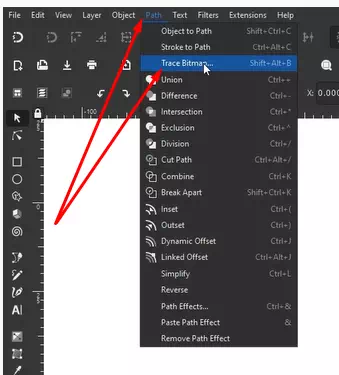
Step 4: Clicking on the Trace Bitmap tool, you will get a new dialogue box where there are two options- Single Scan and Multiple Scans. If your image is black and white, you should use a Single scan and in the case of a colorful image, you have to take Multiple scans.
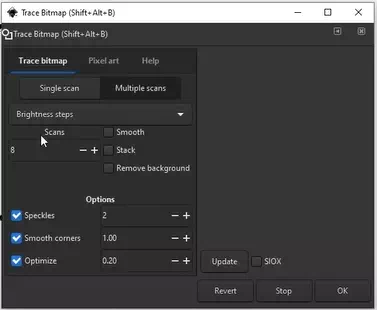
Step 5: Once you apply the Trace Bitmap, you will get a vector copy over the raster image. Just drag and see the result. Now Zoom and scrutinize the edges. If everything is ok, then use it. Otherwise, you have to do further work.
However, for the complex shaped multi-colored image, you should not use Trace Bitmap. Rather, you should apply a manual hand-drawn raster to the vector conversion technique in Inkscape same as the vectorizing process in Illustrator.
How to Convert Raster Images to Vectors in GIMP
You may not a fan of paid software like Adobe Illustrator and Adobe Photoshop. But still, if you want to get high-end vector conversion DIY, you can get it. We will recommend you to use a Free vector conversion tool like Inkscape instead of using GIMP. You will be capable to create HD bitmap images in GIMP for commercial and personal uses.
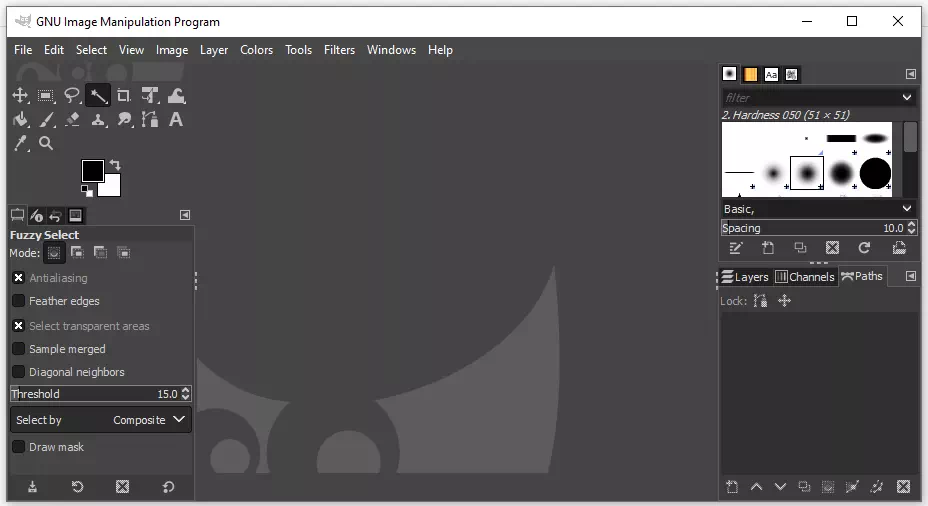
GIMP has no automatic tracing tool. You can draw paths with its Paths tool around a shape and export them as SVG (right-click the path in the Paths dialog > Export Path), but you cannot turn a whole image into colored vector shapes the way Image Trace or Trace Bitmap does.
Many tutorials that promise “vectorize in GIMP” actually use GIMP to clean up the image and then trace it in Inkscape or another tool.
So for free vector conversion, use GIMP to prepare the image (crop, raise contrast, remove the background) and Inkscape to trace or redraw it.
GIMP is an open-source raster editor, closer to Photoshop than to Illustrator.
In a nutshell…
In short: GIMP can export simple paths as SVG, but it is not a vector conversion tool.
Types of vector conversion
- Raster to vector: turning JPG, PNG, GIF, BMP or TIFF artwork into paths (the subject of this guide).
- Vector to vector: converting between vector formats (AI, EPS, PDF, SVG, CDR, DXF), cleaning up an old vector file, or simplifying it for cutting or embroidery. Export from the master file where possible instead of converting one export into another.
- Photo to vector illustration: redrawing a photo as a flat or line-art illustration. It looks like a drawing, not a photo.
Before you start, check whether a vector version already exists: ask your designer or printer, and look in old emails and brand folders for AI, EPS, SVG or PDF files. Not sure whether a file is vector? See how to tell if a file is really vector.
If you would rather have it done, Vector Design US redraws raster images by hand from $7 per image. You get an exact quote by email before you pay, 2 free revisions and a 100% money-back guarantee. See raster to vector conversion.
Can you convert a raster image to a vector illustrator?
Yes, we can convert a raster image to a vector for the companies. Whatever services you need from raster to vector conversion, vector line drawing, logo conversion, photo editing, etc. Vector Design US Inc can provide you with the most experienced experts and commercially these images will perform.
Should one use a free raster to vector image converter?
Free converters are fine for simple, high-contrast shapes and quick tests. For commercial printing, check the result closely before you use it: zoom in on curves and small text, and look for rough edges, extra nodes and missing details, which become obvious when the design is printed large, cut or stitched.
Can raster images be converted to vectors?
Yes, it is possible to convert raster images into vector images. If you can, try to do it yourself or you can send us your files, and we will convert raster images to vector images.
How to convert raster image to vector in illustrator?
If you know how to create a vector file, it is easy to convert raster images into vector images. Our vector artists redraw images by hand for print, signage, cutting and embroidery. However, there are a lot of ways to convert raster images. Among them the basic way of vector conversion is-
- Open an image in Illustrator software.
- Analysis of the image and select the pen tool.
- Create paths around the image and inside the images based on the color and light shades.
- In this way, you can create vector line drawings.
- For creating vector silhouettes apply the automatic image tracer tool from Adobe Illustrator.
- Realistic vector illustration is possible by maintaining some advanced methods.
To sum up, here we have shown multiple ways of creating a vector image from a raster image file using multiple vectorizations tools. Hopefully, now you can do vector images in Photoshop and Illustrator. These are the easiest two ways of vector conversion, but there are many other professional ways to convert a vector image. The advanced raster to vector conversion services needs a lot of skills and patience. If you want to know about the advanced vectorizing of images, stay in our touch.