
Vector Work in Adobe Illustrator: A Practical Guide
Adobe Illustrator is the program most professional vector artists use to draw logos, line art and illustrations as scalable paths. This guide walks through the core techniques, from the pen tool to exporting print and web files, explains when automatic tracing falls short, and shows when it makes sense to hand the job to our artists instead.
- Pen tool and anchor point basics
- Image Trace versus manual redrawing
- Document setup and color modes
- Exporting AI, EPS, SVG and PDF correctly
How Vector Drawing in Adobe Illustrator Works
Instead of painting pixels, you place anchor points and pull handles to shape curves, building closed paths that can be filled, stroked and layered. Every shape stays editable: you can move a point, change a color or resize the whole drawing without losing quality. That is why sign makers, printers and embroiderers ask for files created this way.
- Anchor points define every curve
- Fills and strokes stay editable
- Artboards set the output size
Core Techniques for Clean Vector Artwork
The habits that separate tidy, print-ready files from messy ones.
Pen Tool Paths
Place points at the ends of curves, not along them; fewer points give smoother, easier-to-edit shapes.
Image Trace vs Redraw
Automatic tracing suits rough previews; logos and detailed art need paths placed by hand.
Layers & Groups
Separate outlines, colors and text into named layers so the file stays easy to adjust later.
Strokes to Outlines
Expand strokes before sending to cutters or embroiderers, so line thickness cannot change.
Type to Outlines
Convert lettering to shapes for final files, keeping a live-text copy for future edits.
Saving & Exporting
Keep an AI master, then export EPS or PDF for print, SVG for web and PNG for quick previews.
Common Mistakes in Vector Files
Problems printers and machine operators most often send back.
Rather Have Our Artists Draw It?
If time is short or the artwork is detailed, our team redraws it by hand in Adobe Illustrator from $7 per image for simple designs. Complex illustrations are quoted after we see them. You receive the exact price by email and pay before work starts.
- Standard delivery in 24 hours
- Rush jobs in 6 hours (extra charge may apply)
- Settle the invoice by PayPal, Visa or Mastercard
- AI master with EPS, SVG, PDF and PNG
Too Many Files to Redraw Yourself?
When a backlog of logos or artwork piles up, send it as one batch. We draw every file to the same standard and quote the batch once we have reviewed it.
- Same layer structure in every file
- Consistent naming
- Fonts outlined plus live-text copies
- One quote for the batch
For hands-off conversion, use our image to vector conversion service. Original artwork drawn from a brief is covered by digital illustration and children’s book illustration, and outline-only drawings by vector line drawing.
When to Hand the Work to a Studio
The source is poor
Blurry, tiny or skewed images need an experienced eye to rebuild details correctly.
The deadline is close
A dedicated artist can turn simple artwork around in 24 hours, or 6 with rush.
Machines will read it
Cutters, engravers and embroidery software need perfectly closed, tidy paths.
You want a checked result
Our files pass in-house QC and come with a money-back guarantee if they miss the brief.
One-click auto tracing
- Lumpy curves and jagged corners
- Hundreds of unnecessary points
- Colors split into odd fragments
- Text traced as distorted shapes
Redrawn with the pen tool
- Smooth curves from few points
- Lean, editable paths
- Clean, deliberate color areas
- Lettering rebuilt to match
A Pet Photo Turned Into Pen-Tool Line Art
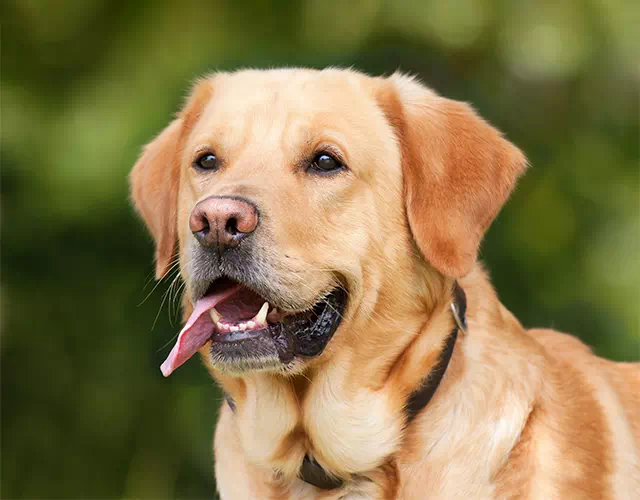
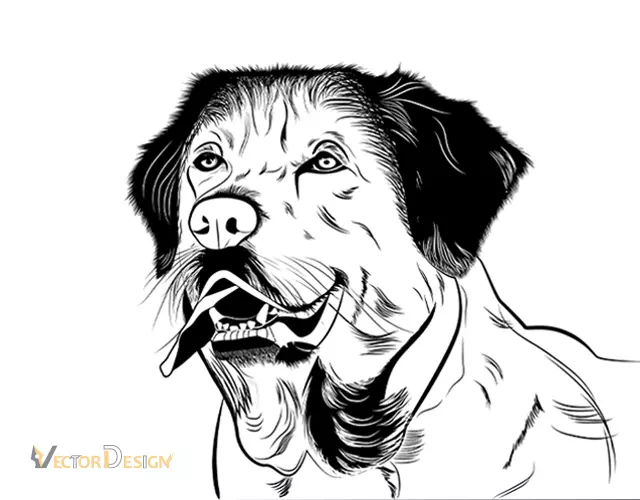
Example: a pet supply shop wants line art of a golden retriever for mugs, tote bags and an engraved tag.
- The challenge
- Auto tracing turns the fur and shadows into noisy blobs that cannot be printed or engraved cleanly.
- The approach
- An artist draws the outline and key fur strokes with the pen tool, using varied line weights for depth.
- The result
- An AI master with outlined strokes, plus EPS, SVG and PNG exports for each product.
How It Works
Try it yourself
Use the techniques above for simple shapes and quick edits.
Or send the image
Upload it and get an exact emailed price; paying it puts an artist on the job.
We redraw it
An artist rebuilds the artwork with the pen tool, then QC checks it.
Receive the files
Your AI master and exports arrive together; two free revisions apply.
What Clients Say About Our Artists
“I often receive jpg logos from clients who need to do signage or embroidery, where vector art is required. I’ve used Vector Design for several years and they are always extremely quick and the quality of their vector files is excellent.”Merili LoucksSignage & embroidery · Google review
“I’ve been in the promotional products industry for 45 years and they are the most efficient design company I have worked with.”Don GardinerPromotional products · Google review
“I have used their services on several projects, always timely and very professional. They are our go-to partner.”Scott TurnerRepeat client · Google review
Rated five stars in 500+ Google reviews.
Adobe Illustrator Vector Work FAQ
What is Adobe Illustrator used for?
It is a vector drawing program used to create logos, icons, line art, illustrations, packaging and print layouts. Artwork is built from editable paths rather than pixels, so it can be resized for anything from a pin badge to a billboard without losing sharpness.
How much does it cost to have an image redrawn in Adobe Illustrator?
Our artists redraw simple artwork from $7 per image and deliver an AI master with EPS, SVG, PDF and PNG copies. Detailed illustrations are priced after review. Upload the image, receive an exact quote by email and pay before work begins.
Is Image Trace good enough for logos?
Usually not. Automatic tracing guesses edges from pixels, producing uneven curves, extra points and distorted lettering. It can work for rough textures or quick previews, but logos and anything sent to a printer or cutter should be redrawn by hand.
What is the difference between a stroke and a fill?
A fill colors the inside of a shape, while a stroke is a line along its path with a set thickness. Before sending files to cutters or embroiderers, expand strokes into filled shapes so the line width cannot change when the artwork is resized.
Which format should I save my artwork in?
Keep an AI file as your editable master. Export PDF or EPS for printers, SVG for websites and cutting machines, DXF for CAD or laser software, and PNG for quick sharing. Outline text in the final files and keep a live-text copy.
Is Vector Design US part of Adobe?
No. We are an independent graphic production studio in Brooklyn, operating since 2010. Our artists use Adobe Illustrator and other professional tools for client work, and we mention the software only to describe how we work.
Send Us the Artwork to Redraw
Upload the image you are struggling with. You will get a precise price and delivery time by email, and drawing begins as soon as you pay.